Minimal, permission-free Android document viewer for private on-device reading
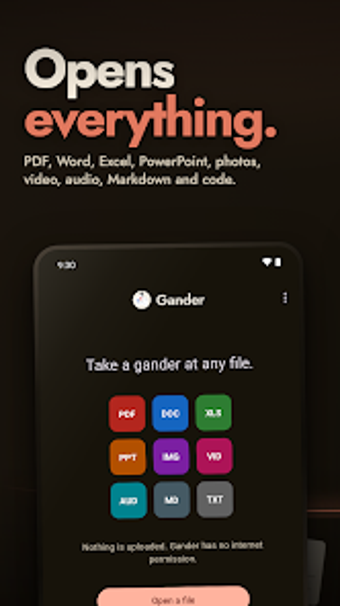
Opens PDFs, Office files, Markdown, images and 3D models on-device using the Android file picker, with full-text search and thumbnail navigation. Gander: PDF & Document Reader, created by Arjun Maniyani, is a privacy-focused document viewer for Android that refuses broad storage or Internet permissions. Key capabilities include a 5MB APK, night mode that preserves images, and in-archive viewing. It fits privacy-conscious students and professionals who need an offline, low-footprint reader for diverse file types.
Gander keeps documents strictly local and auditable
Zero-permission architecture is the app's defining operational model: it omits the INTERNET permission and uses the Android Storage Access Framework to open only files or folders you grant. That design makes it structurally impossible for the app to transmit data off-device, and the MIT open source license lets auditors inspect the code. For workflows that require guaranteed offline handling, this provides a clear, verifiable boundary.
The app supports varied file types used in daily work
Gander renders PDF, Microsoft Office formats, OpenDocument files, Markdown, plain text, source code, images, audio/video, and .stl 3D models inside a single viewer. It also previews files inside ZIP archives without manual extraction and offers full-text Find with match navigation, which supports quick location of passages across documents. These capabilities suit tasks such as reading reports, inspecting code snippets, or previewing model files on the move.
Workflow behavior and accessibility match mobile reading needs
The viewer uses system pickers for file access and shows thumbnail previews and folder-based navigation, which keeps the file-selection flow within Android conventions. Text selection and screen reader compatibility are present for PDFs, so accessibility-minded users can extract passages or hand text to other apps they choose. The 5MB APK and on-device rendering keep the tool light on standard business hardware during reading sessions.
Onboarding, limits, and integration with existing processes
There is minimal onboarding because the app opens files through familiar system dialogs rather than a proprietary library; users grant access per document or folder. The trade-off is deliberate: no cloud sync, no background access, and no direct integrations. That means teams who need centralized storage or automatic sharing must combine Gander with separate sync tools, while individuals handling confidential materials keep everything local.
Gander suits privacy-first readers and solo professionals
Gander is a pragmatic option for privacy-conscious users, students, and professionals who need a compact, offline-capable viewer for many document types. It favors manual file handling over automated sharing, so choose it when you must keep data on-device and avoid background services. For collaborative, cloud-based workflows, expect to pair the app with separate storage tools; for private reading, it performs reliably and predictably.